Showing posts with label 4pinf. Show all posts

Sunday, 4 May 2025

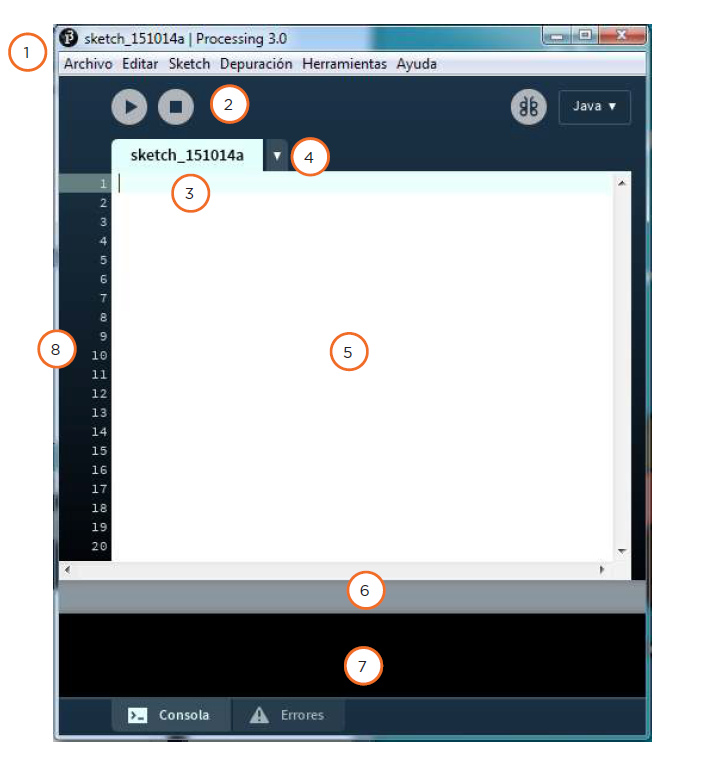
PROCESSING

Processing is an open-source programming language and integrated development environment based on Java, used as a medium for teaching and creating multimedia and interactive digital design projects. It is developed by artists and designers as an alternative tool to proprietary software.

Processing es un lenguaje de programación y entorno de desarrollo integrado de código abierto basado en Java, que sirve como medio para la enseñanza y producción de proyectos multimedia e interactivos de diseño digital. Es desarrollado por artistas y diseñadores como una herramienta alternativa al software propietario. 

URL to download the program: https://processing.org/

You can download processing-4.3.3. for windows x64 here (you dont need to install anything only run the exe file)


Actividad 1: Hello Word - Drawing a dot and a line - Dibujar un punto y una línea

To draw a dot use the sentence: point (x,y);

To draw a line use: line (x1,y1,x2,y2);

Actividad 2: Drawing simple geometric shapes - Dibujar formas geométricas simples


Activity 3: Drawing a house
You can follow Amalia's model or design your own


Actividad 4: Dibujar los aros olímpicos
- Contornos de 5 >> strokeWeight(5);
- Figuras transparentes >> fill(R,G,B,0); >> the last number is the opacity 0=transparent
- Fondo blanco >> background(255);


✧ ➷༄*ੈ✩ ✧ ➷ೃ༄*ੈ✩ ✧ ➷ೃ༄*ੈ✩

VARIABLES
A variable is a memory address where data can be stored. The use of variables involves three actions:
1.-Defining the variable (int, float, boolean, char, string)
2.-Assigning it a value
3.-Using the variable

Una variable es una dirección de memoria donde se puede guardar un dato. El uso de variables implica tres acciones:
1. Definir la variable (int, float, boolean, char, string)
2. Asignarle un valor
3. Utilizar la variable

FUNCTIONS
A function is a set of instructions grouped under a single name. There are functions defined in the development environment, such as draw() and setup(), as well as others that can be defined by the user. To execute a function, you need to use the following syntax:

Una función es un conjunto de instrucciones agrupadas bajo un mismo nombre. Existen funciones definidas en el entorno de desarrollo como draw() y setup(), y otras que puede definir el usuario. Para que se ejecute una función hay que usar la sintaxis:
void setup (){
código que se va a ejecutar
}
Actividad 5: Elaborar un programa para controlar el ratón - Hola Mouse!

BUCLES Y CONDICIONALES
Cuando el programa tenga que tomar una decisión utilizaremos la sentencia condicional if / else que indicarán las instrucciones que se ejecutarán si se cumple o no una condición. Se utilizarán los signos =>< para establecer esas condiciones.

if (nombre ==5){
//instrucciones que se ejecutarán si se cumple la función
}
else{
//insrucciones que se ejecutarán si no se cumple la función
}
 
Para repetir una o más instrucciones un número determinado de veces utilizaremos la sentencia for o while ...

for (byte i=0; i<10 ; i=i+1){
//instrucciones a repetir
}
  *********************
while (boton==0);{
//instrucciones a repetir
}

Actividad 6: Hola Mouse Avanzado - el color del trazo va cambiando de color

Actividad 7: SEMÁFORO


Para dibujar este semáforo copiamos el siguiente código:


void setup() {
  size (400,400);                                        // Creamos una ventana de 400x400 pixeles
  rect(120,20,120,360);                             // Dibujamos un rectángulo
  triangle(20,20,120,20,120,120);             // Triángulo  en la parte superior izquierda
  triangle(240,20,340,20,240,120);           // Triángulo  en la parte superior derecha
  triangle(20,140,120,140,120,240);        // Triángulo  en la parte central izquierda
  triangle(240,140,340,140,240,240);      // Triángulo  en la parte central derecha
  triangle(20,260,120,260,120,350);        // Triángulo  en la parte inferior izquierda
  triangle(240,260,340,260,240,350);      // Triángulo  en la parte inferior derecha
  fill(0,0,0);                                                 // Ponemos el relleno del fondo en negro
  ellipse (180,80,100,100);                        // Dibujamos el círculo superior
  ellipse (180,200,100,100);                      // Dibujamos el círculo central
  ellipse (180,320,100,100);                      // Dibujamos el círculo inferior
}

A continuación programamos el siguiente código para que vaya encendiéndose de cada color:

* No olvidar definir la variable time al principio para poner el tiempo a cero:


Y finalmente definimos el dibujo para cada color:


Actividad 8: DEPÓSITO

El depósito debe simular que se llena con la letra "a" y se vacía con la tecla "z" 


Monday, 28 April 2025

MACHINE LEARNING

 SCRATCH AND MACHINE LEARNING

:: INTEF (Instituto Nacional de Tecnologías Educativas y Formación del Profesorado): Inteligencia Artificial en el aula con Scratch

:: ML4K - Woorksheets - Aula Inteligente


Once you train your model in ML4K you try this code in Scratch 3:


Saturday, 22 March 2025

Machine Learning - Introduction - 4PINF

 Artificial Inteligencie and Machine Learning

Questions:
1. What is machine learning?
2. How do computers learn from data?
3. What is supervised learning?
4. Can you give some real-world examples of supervised learning?
5. What is unsupervised learning?
6. What are some real-world applications of unsupervised learning?
7. What is reinforcement learning?
8. How does reinforcement learning work in video games?
9. Why is machine learning important in everyday life?
10. Where can kids learn more about AI and machine learning?
11. What is an example of AI in smartphones?
12. How do self-driving cars learn?
13. What type of learning finds patterns without labels?
14. What does reinforcement learning use?
15. What helps AI improve over time?


Monday, 24 February 2025

APP INVENTOR - Proyecto Amar a la Bestia


Realizar una aplicación con App Inventor sobre el libro de Nohelia Alfonso, "Amar a la Bestia" que tenga una pantalla principal donde aparezca la portada del libro y un menú con al menos los siguientes botones o enlaces:

- Mapa

- Autora

- Banda Sonora

- Sinopsis

- Opiniones

>> En la pantalla de Mapa, se incluirán marcadores de los principales lugares mencionados en el libro. Los puedes encontrar en este link

En las páginas que se abran aparecerá una imagen del lugar, una breve descripción del lugar y un enlace a un audio del fragmento del libro donde se menciona dicho lugar. Puedes ver las páginas de los principales lugares aquí

>> En la pantalla de Banda Sonara se incluirá un listado de las canciones que aparecen en el libro, con un link (a través de la opción WebViewer) al vídeo de youtube de la canción


Thursday, 20 February 2025

APP INVENTOR


Realiza las siguientes prácticas con esta nueva aplicación:

PRÁCTICA 3 - App Turística con App Inventor
PRÁCTICA 4 - Pacman y/o SpaceInvaders

Tutoriales

- Guía de turismo con App Inventor - IES Fray Luis de León

- Crear enlaces a páginas web

- PacMan - De la web de Justo Rodríguez Orta

- SpaceInvaders - De la web de Justo Rodríguez Orta

Thursday, 6 February 2025

Thunkable Práctica 2: Xilófono

 Descarga aquí los archivos wav para las notas musicales.

Diseña una pantalla de inicio con la imagen de un xilófono, una etiqueta con el texto "¿Quieres tocar? y dos botones con el texto "SÍ" y "NO". Al tocar el botón "SÍ" se accederá a una segunda pantalla donde se encuentra el xilófono, que tendrá los 8 botones que reproducirán las 8 notas musicales. Al tocar el botón "NO" ... invéntate el efecto!

Wednesday, 8 January 2025

Equations with Word and Excel

Try the Equation Editor in Word, explain how to use it and upload your exercice in your blog.


Later, use Excel for creating different equations and functions. Upload also this file to your blog, explaining basic operators and functions in Excel.

Monday, 18 November 2024

Christmas is comming with Scratch!! - PINF

Task: create your own animated Christmas Card with Scratch! 


Some ideas:

https://www.youtube.com/watch?v=cPi8Bj4eGWo&ab_channel=CodeSpeakLabs

https://www.youtube.com/watch?v=K6C0lPmaCTs&ab_channel=CodeKids

CONDITIONS

Version 1: to reproduce automatically for the school community

- At least 5 different sprites

- At least 2 different backdrops

- Last at least 20 seconds

- At least 2 sprites must move and change size

- Text related with Cristmas: Happy Christmas from IES Ramiro II or so...

- Some Christmas sounds or music

Version 2:

- Make a wider version with some interaction with the viewer:

A message that says to click somewhere to appear some effects

Customize any message with the viewer's name (the app may ask your name)

RESOURCES:

Christmas sounds and music: https://uppbeat.io/sfx/tag/christmas

To export and download your project: https://turbowarp.org/

>>>> clik here to see an exaple


PROGRAMMING CHALLENGES FOR CHRISTMAS:

https://moodle.beverleyhigh.net/course/view.php?id=485#section-1