_::_SCRATCH CHALLENGES_2025_2026_::_

Realiza un listado de materiales y herramientas necesarios para las operaciones de renovación del taller de tecnología. Incluye fotografías.
Después realizarán una hoja de cálculo con EXCEL para calcular el presupuesto real.


7 - Bordes y sombreados. Encabezados y pies de página.


ARDUINO
Arduino es una tarjeta controladora que nos sirve de interfaz entre el ordenador y los dispositivos que se deben controlar adaptando las señales de entrada y salida. Básicamente, la tarjeta controladora dispone de un microcontrolador, una pequeña memoria y puertos de entrada y salida.

La plataforma Arduino se programa con un lenguaje propio basado en el lenguaje de programación de alto nivel Processing, lo que significa que es similar a C++

Sensores analógicos son aquellos que nos proporcionan una variación de voltaje dentro de un rango dependiendo de lo que varíe la magnitud física medida. Para conectarlos, utilizaremos las entradas analógicas de la placa, que traducirán los valores de tensión continua que les llegue (entre 0 y 5 V) a valores digitales.
Sensores digitales son los que proporcionan valores de tensión que pueden ser interpretados por la controladora como un valor alto (high, 5 V) o un valor bajo (low, 0 V); por ejemplo, al pulsar o soltar un interruptor. Lo mismo ocurre con los actuadores digitales; por ejemplo, un led, que puede estar encendido o apagado.
.jpg)
PRÁCTICAS INICIALES
>> P1.- Conectar Arduino al ordenador. Encender y apagar un led. Cambio de frecuencia en el parpadeo.
https://ardubasic.wordpress.com/2012/10/13/primer-programa-hola-mundo/
https://makinando.github.io/practicas_arduino/prctica_01.html
>> P2.- Secuencia de leds (Proyecto Halloween)
https://makinando.github.io/practicas_arduino/prctica_08.html


https://ardubasic.wordpress.com/2012/10/25/semaforo/
https://makinando.github.io/practicas_arduino/prctica_06.html
1.- Conecta todos los periféricos necesarios para comprobar el funcionamiento de uno de los ordenadores del taller de informática.
2.- Una vez que consigas que funcione y arranque el sistema operativo, anota los siguientes datos:
- Tipo y versión de Sistema Operativo
- Capacidad del disco duro
- Memoria RAM
3. Apaga y desenchufa el ordenador
4. Abre la caja y localiza los principales componentes: placa base, microprocesador, disco duro, memoria ram, fuente de alimentación, tarjetas de expansión, etc.
5. Realiza fotografías y grabaciones para después editar un vídeo que explique todas las partes de un ordenador y sus conectores.
6. Prueba a aumentar la memoria RAM colocando algún módulo compatible extra.
7. Simula un cambio de la fuente de alimentación.
8. Cierra de nuevo el equipo y comprueba que funciona correctamente de nuevo.
Crea una hoja excel con los elementos necesarios para construirte tu propio ordenador y calcular el presupuesto.
Busca los dispositivos para copiar las imágenes y sus precios en la web.
Ejemplo:

Puedes ayudarte de la web https://es.buildcores.com/ para simular tu propio ordenador y obtener una vista 3D de tu creación. Luego vas pasando los componentes a tu hoja excel con los precios para calcular el total.
CUANDO TENGAS EL DOCUMENTO TERMINADO PARA SUBIRLO A TU BLOG SIGUE LAS INSTRUCCIONES DE LA PROFESORA:
1.- SUBIR ARCHIVO XLS A TU DRIVE
2.- DAR PERMISOS PARA QUE ALGUIEN CON EL ENLACE LO PUEDA VER Y COPIAR EL ENLACE EN TU BLOG
3.- REALIZA UNA CAPTURA DE PANTALLA DEL DOCUMENTO COMPLETO Y PUBLÍCALA EN TU BLOG, DE TAL FORMA QUE AL PINCHAR SOBRE ELLA SE ABRA EL DOCUMENTO EXCEL.

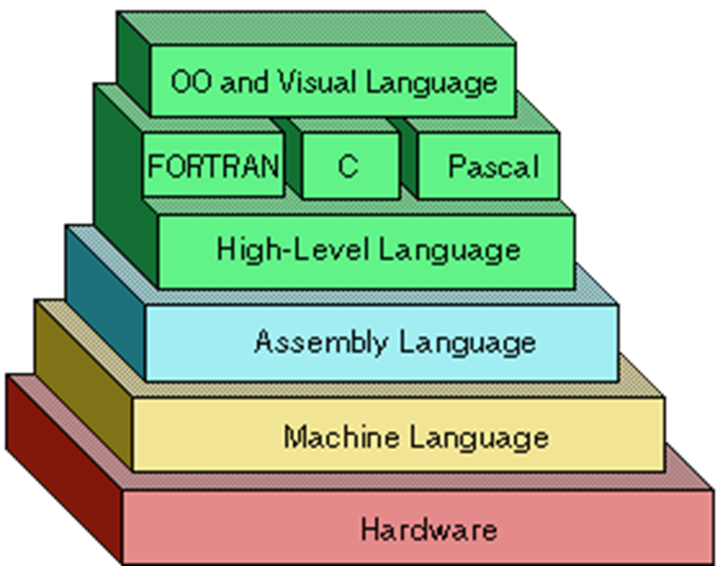
Low-level: Machine code (binary code), Assembly...
Hight-level: JavaScript, Python, Java, Visual Basic, Perl, Ruby, C#, and many others...


Componentes:
- ENTRADA (sensores)
- CONTROL (tarjeta controladora)
- SALIDA (actuadores)
Tipos:


Create a blog using "blogger". Follow these instructions:
- Access to blogger with your account @gmail.com
- Blog's URL: xxxxdigramiro.blogspot.com (xxxx=student's number)
- Blog's title: Digitalization 4th ESO Name
- Go to "Configuración" and change the language of your blog into English
PRIVACY: - Go to "Settings" now, and disable the option to be visible to search engines and in the PERMISSIONS section, change Reader Access from "public" to "custom readers". Then invite the teacher adding this email address: profesorticramiro@gmail.com

- Create an "avatar" with your physical appearance and download the images.
Visit these pages:
- To have access to the class 4PINF2025 follow this link: https://login.pixton.com/jhzwzx
http://www.pocoyo.com/en/pocoyizeyourself


- For this first post in your blog "01.Introduction" write a presentation about yourself and what for are you using this blog. Also explain your previous knowledge and experience with computers and other devices. You can use these questions to help you...
Do you have a laptop or tablet for yourself at home? Do you share with your family? How many hour per day/per week do you use a computer at home? How many hours do you spend with your smartphone? Do you think you are adicted to your phone or social media? What do you think about the new rules about the phone at school? Do you know something about programming? Do you have any experience with programming? Why did you choose this subject? Do you like computers and programming?
Add the image of your "avatar" in this post
- Finnaly add a gadget in the side of your blog that will be title as LINKS OF INTEREST and here you add the teacher's blog and so far, pixton and pocoyize website. Here, you will have to publish the link of every application we use!!

- Contenidos y Evaluación
- Book >>> Donostiarra (978-84-7063-658-5 Tecnología y Digitalización 3º – Proyecto STAR)
- Prueba inicial (Fotocopia)
+ Cuaderno
- Contents and Assessment - link
- Book >>> Donostiarra (978-84-7063-660-8 Technology and Digitalisation 3º ESO – Project STAR)
- Initial Test (Photocopy in Spanish) - - Translate the answers into English
+ Notebook
PINF : Programación Informática
Programming - Coding



A) Open Scratch and, after logging in, create a program where the cat (Sprite) does the following actions when the green flag is clicked:
Say "Hello" for 2 seconds.
Move 100 steps to the right and wait 1 second.
Ask: "Can you help me?"
If your answer is yes: say "Thanks" for 2 seconds.
If your answer is no: say "I had to try."
Finally, say "See you soon."
Presentación de Contenidos ---- Cuadro Programación
ACTIVIDAD 1
Crea tu blog con blogger, siguiendo estas instrucciones:
- Accede a "blogger" desde tu cuenta de gmail
- URL del bog: xxxxdigramiro.blogspot.com (xxxx=tu nombre)
- El título del blog será: Digitalización 4ºESO de xxxx (tu nombre)
- Personaliza tu blog de tal forma que se vea el contenido completo de cada entrada sin necesidad de entrar en ella.
- Accede a las opciones de configuración para que el blog sea privado y crea una invitación para la profesora añadiendo la cuenta de correo: profesorticramiro@gmail.com
- Crear un "avatar" que se parezca a ti y publícalo como imagen en tu blog. Visita estas páginas:
ACCEDE AL GRUPO DE CLASE 4DIG2025 A TRAVÉS DE ESTE ENLACE:
https://login.pixton.com/vcy9cx
http://www.pocoyo.com/en/pocoyizeyourself
Añade la imagen de tu "avatar" en esta entrada
- Por último añade a la derecha un gadget que titules ENLACES DE INTERÉS en el que incluyas por el momento los enlaces a las web de pixton y pocoyize, así como al blog de la profesora. En este gadget tendrás que ir publicando todos los enlaces de aplicaciones que utilicemos a lo largo del curso.


